Run your debate team's prep in one place
Team accounts are free. Sign up as a Coach (or switch in Settings if you already have an account), create a team, and give your debaters the join code. Each student sees exactly what you'll be able to see before they join, and can leave any time. You'll see who practiced this week, and each student's speech scores by week and the skills they're working on.
Make a team for free and try it with one debater first.
Create a teamHow it helps without doing the work
Case feedback points at what is weak, then teaches with a different topic
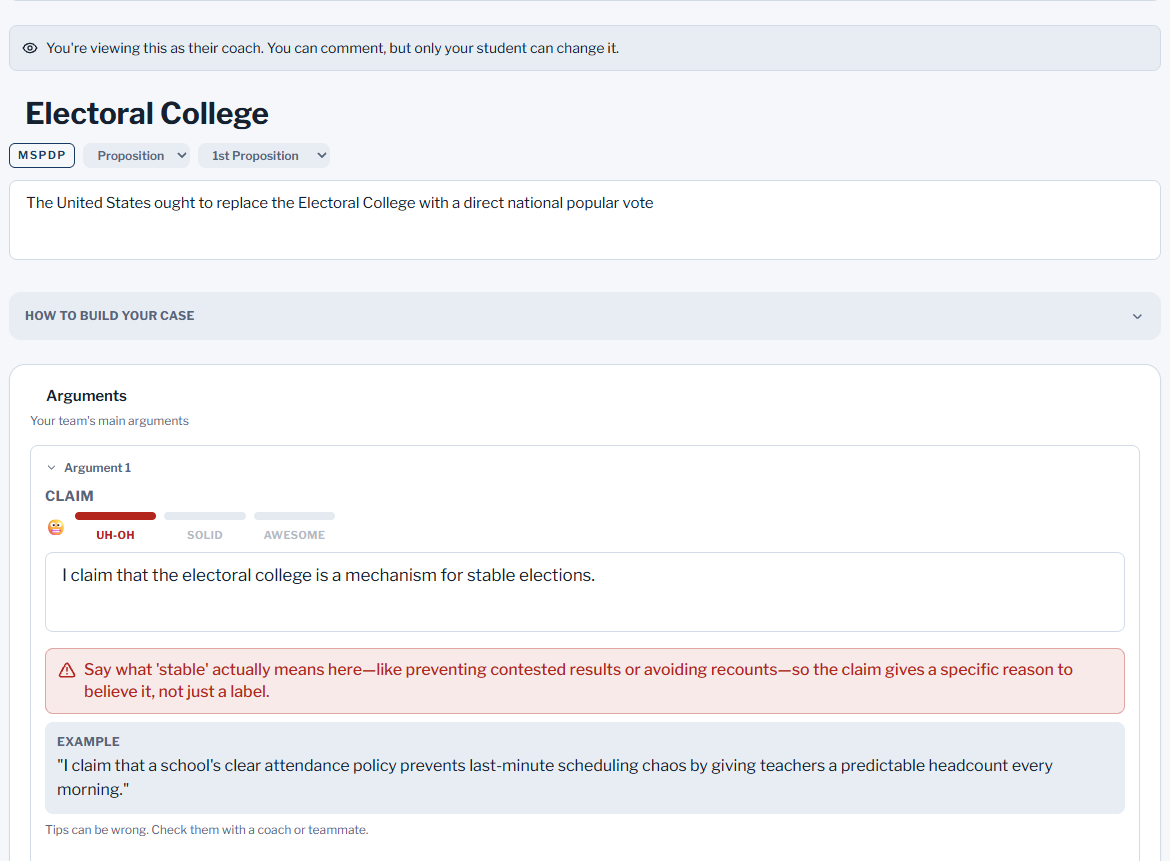
When a student checks an argument in the Case Builder, feedback names the part that needs work and why. Its example is about a different topic, so students see the pattern and still write their own sentence.
Weighing comes as fill-in-the-blank outlines
The weighing builder gives an outline with [blanks] for the student to fill in, not a finished speech. It only gives feedback once the blanks hold the student’s own words.
Tips send students back to a person
Feedback tips remind students that tips can be wrong and to check them with a coach or teammate. It is practice help, not the final word.
Where it does write text
Refute Tables list likely arguments for each side with a short answer to each, as a starting point to research. Speech Feedback can suggest new wording for a sentence; the student answers a question about why before the app will put it in their speech. The rebuttal drill shows a stronger answer after each try, and practice opponents give their own speeches.
What a team gives you today
Premium seats (optional)
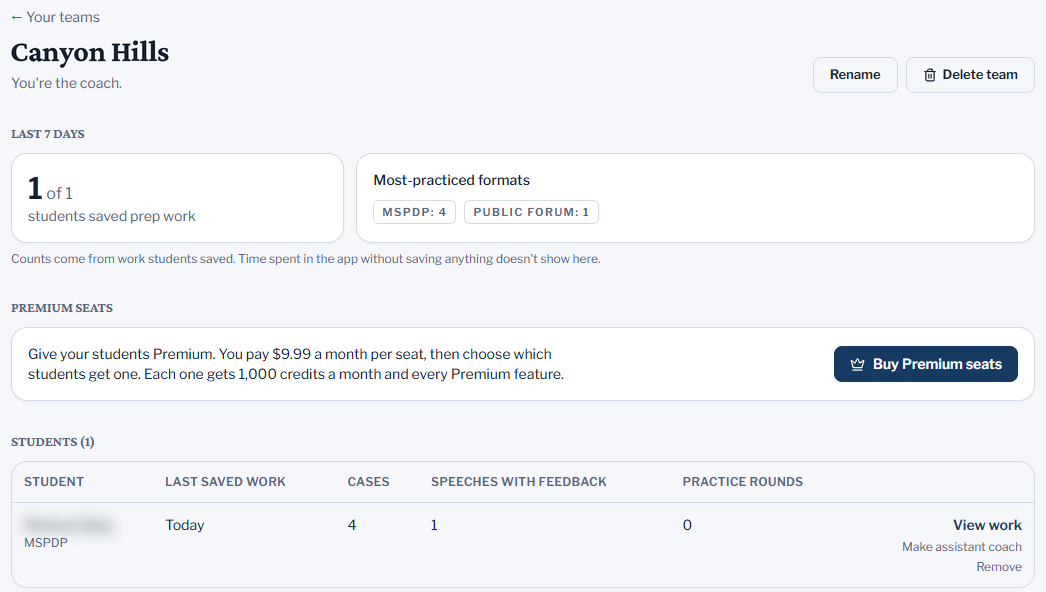
Buy Premium for your students at $9.99 a month per seat, or as a team package, then choose who gets each seat. Move or take back seats any time, and cancel anytime.
A student roster
Debaters join with your team’s code. See what each one saved in the last 7 days, and who has saved nothing for a week or more.
Your students' prep in one view
Open the cases, Refute Tables, speeches with their feedback scores, practice rounds and evidence searches of students who joined. View and comment; you can’t edit.
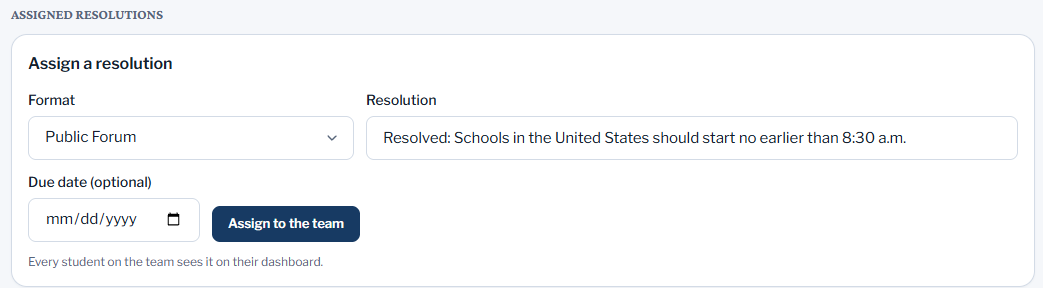
Assign a resolution
Set a format, resolution and due date. Students see it on their dashboard and start a case, Refute Table or evidence search from it in one tap, and you see who started.
A team evidence library
Add evidence cards for the whole team, or copy them from your own library. Students who write in the Full Case style (a traditional case with separate sections and its own evidence library) can add their own, browse every card with who added it, see a history of changes, and save copies for their cases. Students using the AREI Structure style, where evidence is written straight into each argument, don’t use evidence cards, so the library isn’t shown to them.
Assistant coaches
Add assistant coaches who see the same work you do. Run up to 3 teams.
Students need their own account, and should use a personal email: some student school addresses can't be used to sign up. Coach accounts are for people 13 or older who coach or teach debate.
Pricing for teams and schools
Team
Free
- Coach account, roster, assignments and comments
- Students use free accounts with their own credits
- Up to 3 teams, each with assistant coaches
Monthly seats
$9.99 per student / month
- Every seat is full Premium: 1,000 credits a month and all Premium-only tools
- You choose who gets each seat, and can move or take back seats any time
- Paid by card. Cancel any time from the team page
Team package
$89.99 a month, up to 10 seats
- Or $109.99 a month for up to 20 seats. One price for the whole team, not per student
- 10% off for 10 seats ($89.99 instead of $99.90), 45% off for 20 seats ($109.99 instead of $199.80), compared with monthly seats
- Every seat is full Premium: 1,000 credits a month and all Premium-only tools
- A team has a package or monthly seats, not both
- Pay by card on your team page, or ask us for an invoice (30 days to pay, with your purchase order number)
Need more than 20 seats? Use monthly seats at $9.99 per student. A Premium seat is the same as a student’s own Premium: 1,000 credits a month and the Premium-only tools. Seats belong to one team, up to 50 per team. Need an invoice instead of a card? Email thedebateprepsupport@gmail.com with your school, the team, and how many debaters.
See how it works
For coaches: student data
What students store
Their account details and the work they make: cases, Refute Tables, speeches as text with feedback, practice rounds, flows, evidence and searches. Dictation becomes text in the browser; audio is never uploaded or kept.
What you see as their coach
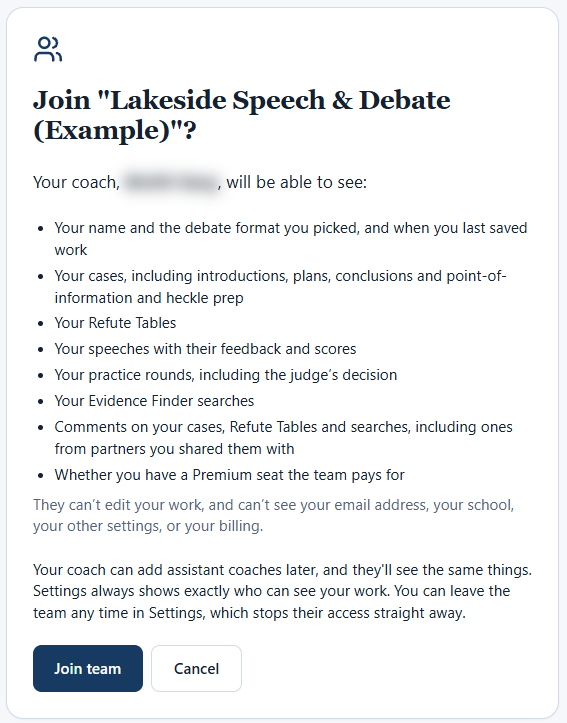
- their name and the debate format they picked, and when they last saved work
- their cases, including introductions, plans, conclusions and point-of-information and heckle prep
- their Refute Tables
- their speeches with their feedback and scores
- their practice rounds, including the judge’s decision
- their Evidence Finder searches
- comments on their cases, Refute Tables and searches, including ones from partners they shared them with
- whether they have a Premium seat the team pays for
Only while they're on your team. Never their email, school, settings or billing.
Who can sign up
Students under 13 can use it after a parent or guardian approves by email. They can join your team only if a parent or guardian approves that separately, and only on teams where we have switched this on. Until the parent says yes, you see nothing about the student except that a join is waiting. After that you see their first name and last initial, never their email or school, and the parent can stop it at any time. Sharing with partners stays off for them. We ask for a personal email; some student school addresses can't be used.
No ads, no selling data
There are no ads and no advertising or third-party analytics trackers, and we don't sell anyone's data.
Deleting data
A student can delete their account and everything in it from Settings → Account → Delete my account, or ask us at thedebateprepsupport@gmail.com. Leaving a team ends your access straight away. Read the full Privacy Policy.
Questions coaches ask
Does it write cases for my students?
The Case Builder doesn’t. When a student checks an argument, feedback says what’s weak and gives an example on a different topic, and weighing comes as an outline with blanks to fill in. A few tools do write text: Refute Tables list likely arguments for each side with a short answer to each, Speech Feedback can suggest new wording for a sentence (the student answers a question about why before the app will put it in), the rebuttal drill shows a stronger answer after each try, and practice opponents give their own speeches. Students agree to follow their league’s and school’s academic-honesty rules.
Do students need to pay?
No. Every account is free to start, with 100 credits for the coaching tools in the first 14 days and 40 a month after that. Everything else, like the Case Builder, flows, the timer and judge training (short courses for the basics, each event, and advanced judging), has no credit limit. Premium is optional: it adds more credits and a few Premium-only tools, such as character voices for practice opponents and importing flows. Teams are free for coaches. Students on a team use their own free credits unless the coach pays for Premium for them. A coach can buy monthly seats at $9.99 per student per month, or a team package billed monthly: $89.99 a month for up to 10 seats, or $109.99 a month for up to 20 seats. Every seat is full Premium: 1,000 credits a month and the Premium-only tools. A team has a package or monthly seats, not both. Need more than 20 seats? Use monthly seats at $9.99 per student.
Why can’t students use school email?
Some student school addresses can’t be used to sign up at all, and some school email systems block or delay email from outside services, which can stop sign-in emails and team invites arriving. A personal email also keeps working after a student changes schools. So we ask students to use a personal email, or sign in with a personal Google or Microsoft account.
Can I see my students’ work?
Yes, once a student chooses to join your team with your code. Before joining they see your name and this list of what you’ll see: their name and the debate format they picked, and when they last saved work; their cases, including introductions, plans, conclusions and point-of-information and heckle prep; their Refute Tables; their speeches with their feedback and scores; their practice rounds, including the judge’s decision; their Evidence Finder searches; comments on their cases, Refute Tables and searches, including ones from partners they shared them with; whether they have a Premium seat the team pays for. You can’t edit their work, and can’t see their email address, school, other settings or billing. You can comment on cases, Refute Tables and evidence searches. If a student leaves the team, your access ends straight away. Students under 13 can join only after a parent or guardian approves it in a separate email, and only on teams where we have switched this on. Until the parent says yes, you see nothing about that student except that a join is waiting. After that you see their first name and last initial, never their email or school, and the parent can stop it at any time, which ends your access straight away.
What formats are supported?
24 formats: Beginner Debate, Public Forum, Lincoln-Douglas, Policy Debate, Parliamentary Debate, World Schools, Student Congress, ESPDP, MSPDP, HSPDP, British Parliamentary, Karl Popper Debate, Moot Court, Mock Trial, Socratic Debate, Extemporaneous Speaking, Impromptu Speaking, Australs (AUDC Style), Asian Parliamentary, CNDF, CEDA Policy, NDT Policy, SPAR, Town Hall Debate. Students can also describe their own league’s format, and the timer and Case Builder follow it.
Who runs this?
The Debate Prep is an independent project built by a competitive debater. Reach us any time at thedebateprepsupport@gmail.com.
Checking against your league's rules? How the app fits NSDA's rules.
Tell us about your team
Two minutes. We'll only use your email to talk to you about team accounts and team billing, and nothing is charged without your say-so.